Thursday, February 04, 2010

Thursday, January 28, 2010
US department of defence advocates Open Source
US Department of Defence: "To effectively achieve its missions, the Department of Defense must develop and update its software-based capabilities faster than ever, to anticipate new threats and respond to continuously changing requirements. The use of Open Source Software (OSS) can provide advantages in this regard." (pdf on the website of David A. Wheeler)
Basic web server on a microcontroler
Web Xweb32 Lite is a web server that runs on a microcontroler ATMEGA32. With that you can visualise variables within a webbrowser. This is even smaller than any barebone computer.
A PC in the keyboard
A PC that fits in the keyboard for 99 EUR with linux: Northteck Gecko Surboard (article on Linux Devices.com)
Xcore is the manufacturer.
Xcore is the manufacturer.
Géolocalisation par wifi
Le service de géolocalisation est assuré par la technologie Wi-Fi Positioning System (WPS). Grâce au Wi-Fi intégré, les cartes Eye-Fi détectent les réseaux Wi-Fi environnants pendant que vous prenez des photos. Une fois que les photos ont été transférées, le service Eye-Fi leur associe des données géographiques.
Wednesday, January 27, 2010
Connect to a SQLite database using python
SQLite is included since python 2.5 I connected to a SQLite database created from zotero that way:
import sqlite3 as sqlite
con = sqlite.connect('zotero.sqlite')
cur = con.cursor()
cur.execute('CREATE TABLE foo (o_id INTEGER PRIMARY KEY, fruit VARCHAR(20), veges VARCHAR(30))')
con.commit()
cur.execute('INSERT INTO foo (o_id, fruit, veges) VALUES(NULL, "apple", "broccoli")')
con.commit()
print cur.lastrowid
cur.execute('SELECT * FROM foo')
print cur.fetchall()
Here is the output:
>pythonw -u "test_sqlite.py"
1
[(1, u'apple', u'broccoli')]
2
With help from DZone snippets and devshed. However devsched's information about downloading and building the sqlite library is outdated as it is now included in python.
Edit:
In a later post, I explain how to connect do an SQLite database with the R statistical software and a package called dplyr.
import sqlite3 as sqlite
con = sqlite.connect('zotero.sqlite')
cur = con.cursor()
cur.execute('CREATE TABLE foo (o_id INTEGER PRIMARY KEY, fruit VARCHAR(20), veges VARCHAR(30))')
con.commit()
cur.execute('INSERT INTO foo (o_id, fruit, veges) VALUES(NULL, "apple", "broccoli")')
con.commit()
print cur.lastrowid
cur.execute('SELECT * FROM foo')
print cur.fetchall()
Here is the output:
>pythonw -u "test_sqlite.py"
1
[(1, u'apple', u'broccoli')]
2
With help from DZone snippets and devshed. However devsched's information about downloading and building the sqlite library is outdated as it is now included in python.
Edit:
In a later post, I explain how to connect do an SQLite database with the R statistical software and a package called dplyr.
Visualise the history of python development
In this blog I found a link to this video of the history of python development from the release date in 1991 to the time when Gido Van Rossum was hired by google in dec. 2005.
First plot with python (x,y)
Showing a plot with pylab module from the python (x,y) package that I just installed on windows.
from pylab import *
test_list = [1,2,6,123,51,32]
plot(test_list)
title('Test plot of a list of numbers')
show()

from pylab import *
test_list = [1,2,6,123,51,32]
plot(test_list)
title('Test plot of a list of numbers')
show()

Monday, January 25, 2010
Metaprogramming
Metaprogramming " is the writing of computer programs that write or manipulate other programs (or themselves) as their data."
Python at google, quotes
In February 2006 Greg Stein spoke about Python at google. I liked this quote: "Greg mentioned that to create code.google.com took about 100 lines of python code. But since it has so many dependencies, the build system generated a 3 megabyte makefile for it!" That gave me an idea of what a *glue* language means!
On the same blog there is another quote from Guido Van Rossum: "Guido uses print statements for 90% of his debugging and a debugger for the times when his brain stops working or he has to debug some wierd code that someone else wrote. "
On the same blog there is another quote from Guido Van Rossum: "Guido uses print statements for 90% of his debugging and a debugger for the times when his brain stops working or he has to debug some wierd code that someone else wrote. "
Thursday, April 05, 2007
Compress images in a microsoft word file
When you have a word file over 3Mb, it might help to reduce the size of the photos. The problem is often that you use a resolution too high for the print quality.
Let's double click on one of the picture you inserted in your word document, chose [compress] and click on [all pictures in document]. You can now change the resolution to a print quality. This can reduce your file size to a half or a third if you have inserted very big photos from a 7Mb digicam fro example.
Here is a screenshot from the action:
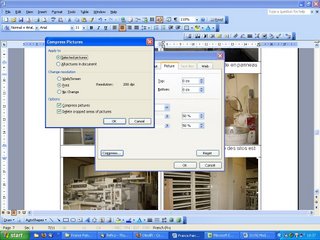
Enjoy the small file size!
Let's double click on one of the picture you inserted in your word document, chose [compress] and click on [all pictures in document]. You can now change the resolution to a print quality. This can reduce your file size to a half or a third if you have inserted very big photos from a 7Mb digicam fro example.
Here is a screenshot from the action:

Enjoy the small file size!
Thursday, March 23, 2006
use a batch script from cygwin
Yes you can start a batch script from cygwin. What did I use this for? Well, it's usefull to restart a windows service for example with the DOS command
net stop service_name
net start service_name
You can then login remotely with ssh in your cygwin shell and restart the windows service or start any command you can start from dos, just write the commands in a .batch script.
net stop service_name
net start service_name
You can then login remotely with ssh in your cygwin shell and restart the windows service or start any command you can start from dos, just write the commands in a .batch script.
Monday, February 20, 2006
nevow ,the templating engine from twisted needs Zope.
I installed nevow, the templating engine from twisted to create web pages on windows. The problem was that I had to install zope for windows as well. I don't now why.
I plan to use this templating engine because my web page generating scripts are very ugly, with plenty of if, elif, elif and one cannot find the structure of a web page in there.
I plan to use this templating engine because my web page generating scripts are very ugly, with plenty of if, elif, elif and one cannot find the structure of a web page in there.
Monday, February 06, 2006
xls2csv, using python win32com and excel
This python script change a bunch of excel files in cvs files, needs Excel installed on the computer.
If you need to do this on linux, you can try that program: xls2csv.
#
# Save all Excel files in the current dir as csv files
# (CSV = comma separeted values)

from win32com.client import Dispatch
import os,time

xlCSV = 6 #a vba constant for this fileformat
xlApp = Dispatch("Excel.Application")
xlApp.Visible = 1

def saveAsCSV(filename):
    xlApp.Workbooks.Open(filename)
    xlApp.ActiveWorkbook.SaveAs(filename[:-3]+"csv",xlCSV)
    xlApp.ActiveWorkbook.Close(SaveChanges=0)

for root, dirs, files in os.walk(''):
 for file in files:
  if ".xls" in file:
                    print file
                    saveAsCSV(os.path.abspath(file))
xlApp.Quit()
del xlApp
If you need to do this on linux, you can try that program: xls2csv.
Saturday, January 28, 2006
Drupal cooperative website
I use Drupal as a cooperative website on aienstib.com. This engine has a lot of configuration option and it permits special authenticated users to post php code, now that is realy powerfull. I think it is important to follow the best practice guidelines
Tuesday, November 29, 2005
NAT32 router on windows, firestarter on ubuntulinux.
We have 2 separeted networks in the company, I just wanted to redirect an extern querry from the internet, to a webserver located on the second intranet.
On windows I've been using Nat32.exe as a Router. It's quite easy, just set up all the standard rules, select a network card. Then choose config/application mapping, you have to chose a port and an Ipaddress to forward, if the ports are not standard, you'd better double-click on the application name to change the related script. the syntax is as follows.
exec "ppmap add tcp $port $addr $port"
On a linux machine, you can edit iptable. directly, or use a firewall/router program like firestarter.
Go into policy, allow connections from host, forward service, for example: web on firewall port 8000 to IP adress port 80.
It's not realy difficult. I just had a problem because I was using a hostname, it worked only with the IP address.
On windows I've been using Nat32.exe as a Router. It's quite easy, just set up all the standard rules, select a network card. Then choose config/application mapping, you have to chose a port and an Ipaddress to forward, if the ports are not standard, you'd better double-click on the application name to change the related script. the syntax is as follows.
exec "ppmap add tcp $port $addr $port"
On a linux machine, you can edit iptable. directly, or use a firewall/router program like firestarter.
Go into policy, allow connections from host, forward service, for example: web on firewall port 8000 to IP adress port 80.
It's not realy difficult. I just had a problem because I was using a hostname, it worked only with the IP address.
Tuesday, November 08, 2005
ssh secure distant shell
I've not used this yet. It's time I learn how it works. with help from this Ubuntu guide.
to install the server:
sudo apt-get install ssh
then use the client to connect:
ssh user@localhost
enter your password if needed. Et voilà you are connected to localhost, not very interesting. How can you connect remotely from a windows machine?
How do you go arround with the rsa or dsa keys and stuff? see how-to.
On windows you can use the wonderfull program putty to connect to a linux distant ssh server. You can also use winscp, a sort of secure ftp programm.
With putty, you can tunnel the vnc trafic through ssh. using the ssh tunnel on port 5900. Here is a howto. for tightVNC.
I mannaged to connect to a remote linux machine running vncserver. I want to do the oposite: connect from the linux machine to a windows machine running ssh on cygwin. Don't forget to stop the vnc process on linux, so that the port 5900 is free.
The magic formula to create a tunnel:
ssh -L 5900:localhost:5900 windowsuser@host
Then start VNC localhost on linux, there you are :)
to install the server:
sudo apt-get install ssh
then use the client to connect:
ssh user@localhost
enter your password if needed. Et voilà you are connected to localhost, not very interesting. How can you connect remotely from a windows machine?
How do you go arround with the rsa or dsa keys and stuff? see how-to.
On windows you can use the wonderfull program putty to connect to a linux distant ssh server. You can also use winscp, a sort of secure ftp programm.
With putty, you can tunnel the vnc trafic through ssh. using the ssh tunnel on port 5900. Here is a howto. for tightVNC.
I mannaged to connect to a remote linux machine running vncserver. I want to do the oposite: connect from the linux machine to a windows machine running ssh on cygwin. Don't forget to stop the vnc process on linux, so that the port 5900 is free.
The magic formula to create a tunnel:
ssh -L 5900:localhost:5900 windowsuser@host
Then start VNC localhost on linux, there you are :)
Thursday, November 03, 2005
ethereal network sniffer
Ethereal is a programm that listens to the network traffic.
There are capture filters for example:
host 192.168.0.1
to see all the traffic comming and going to that host.
Attention, capture filters are different from display filters: an example of a display filter is
http
You'll see only the http traffic --> cool! you can see the user agent, the get requests and the sites visited by a particular host.
After capturing network trafic, you can save the result to a cap file.
There are capture filters for example:
host 192.168.0.1
to see all the traffic comming and going to that host.
Attention, capture filters are different from display filters: an example of a display filter is
http
You'll see only the http traffic --> cool! you can see the user agent, the get requests and the sites visited by a particular host.
After capturing network trafic, you can save the result to a cap file.
Saturday, October 08, 2005
Human, robot, computer on wikipedia
Subscribe to:
Posts (Atom)

